
Opus to MP3: Convert Opus Audio in WebM
Convert an Opus audio track from a supported WebM file to MP3 locally in your browser. Need to convert a standalone .opus or .ogg file? Use the FFmpeg command below or a desktop converter instead.
This tool accepts WebM only: one Opus or Vorbis track, mono or stereo, up to 100 MiB and 45 minutes. Browser decoding and available memory can impose additional limits.
Load .webm audio file
Drag file here or click to browse · Max file size: 100 MiB
Local Conversion History
0 filesSaved in IndexedDB. History can remain after closing this tab.
100% Local Privacy
Audio never leaves your browser. Zero upload bandwidth, no remote telemetry.
Opus Preflight Engine
Parses EBML container headers, channel layouts, and fixes live MediaRecorder duration tags.
MPEG Frame Verifier
Checks MPEG Layer III headers and complete frame boundaries; reports the frame timeline, not decoded audio quality.
How to convert Opus to MP3 in the browser
- Select a
.webmfile containing Opus audio. The tool inspects the container before decoding. - Choose 128, 192 or 320 kbps for MP3 output. A higher bitrate increases size, not the detail already in the source.
- Start conversion and keep the tab open. The browser decodes audio; the local LAME encoder creates MP3 frames.
- Download the verified output and listen in your intended player. Keep the original recording.
Audio bytes are processed locally, not uploaded for conversion. The site still loads web assets and uses analytics; local conversion is not a claim of zero network traffic. See how to verify privacy.
Opus to MP3 bitrate, file size and device calculator
Pick a duration, source stream and destination to compare estimated MP3 sizes and get a matching FFmpeg command. Estimates are constant-bitrate payload sizes; tags, headers and VBR change real files.
Duration
Source stream
Source audio at ~128 kbps for 3:00 is about 2.7 MiB. This browser converter accepts WebM input; use FFmpeg for standalone .opus files.
Destination
Estimated output size for 3:00
- 64 kbps MP31.4 MiB
- 128 kbps MP32.7 MiB
- 192 kbps MP3 (Recommended for WebM/Opus)4.1 MiBSuggested for this use
- 320 kbps MP36.9 MiB
- Uncompressed WAV (1,411 kbps)30.3 MiB
Suggested: 192 kbps MP3 for Music & Headphones
192 kbps CBR MP3 gives headroom for a ~128 kbps Opus source: MP3 is less efficient than Opus, so matching the source bitrate can add audible artifacts, while going higher mostly adds size. A higher bitrate cannot restore detail the lossy source never kept — compare the sound and size yourself.
ffmpeg -i input.webm -vn -c:a libmp3lame -b:a 192k output.mp3Typical playback support by device
| Device | .webm (Opus/Vorbis) | .opus | .ogg | .mp3 (CBR) |
|---|---|---|---|---|
| Car Stereo USB (FAT32) | Unlikely | Unlikely | Varies | Usually plays |
| Apple iPhone / iPad (Files & Music) | Varies | Varies | Varies | Usually plays |
| Pioneer Rekordbox / Serato DJ | Unlikely | Unlikely | Varies | Usually plays |
| Android Default Player | Usually plays | Usually plays | Usually plays | Usually plays |
| Podcast RSS Hosting (Spotify / Apple) | Unlikely | Unlikely | Unlikely | Usually plays |
| Web Browser Audio (<audio>) | Usually plays | Varies | Varies | Usually plays |
Apple iPhone / iPad (Files & Music): Files and Safari may preview newer WebM/Ogg audio depending on iOS version; the Music app library expects formats such as MP3 or AAC.
Learn more in the Opus to MP3 guide, the FFmpeg and VLC desktop guide and the WebM video audio-track guide.
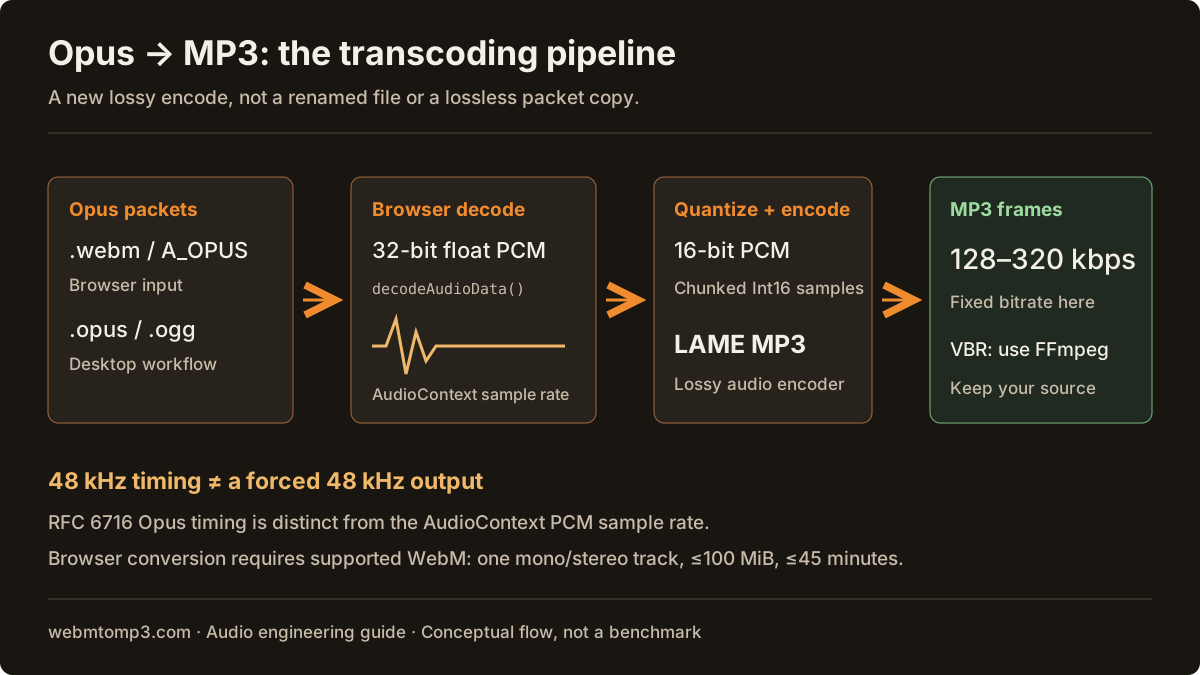
Opus is a codec; .opus, .ogg and .webm are not interchangeable
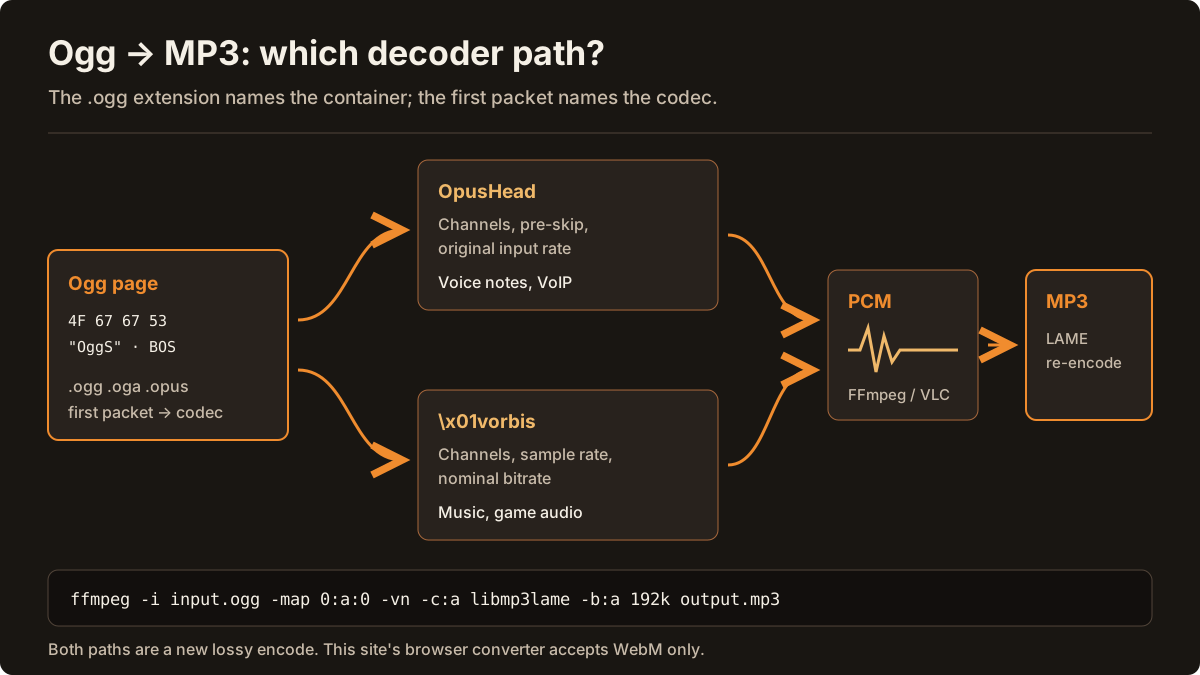
RFC 6716 defines the Opus audio codec. An .opus file normally wraps those packets in Ogg; an .ogg file may contain Opus or another codec. WebM wraps Opus as A_OPUS alongside optional video. The extension alone does not prove the codec.
This converter validates WebM, so changing an Ogg file extension will not make it compatible. For standalone Ogg Opus, use an installed FFmpeg build with libmp3lame:
ffmpeg -i input.opus -map 0:a:0 -vn -c:a libmp3lame -b:a 192k output.mp3Replace input.opus with input.ogg for a readable Ogg source. Choose a new output filename; do not overwrite your original. For desktop steps, see the FFmpeg and VLC guide.
WebM, Ogg and voice-note audio track checker
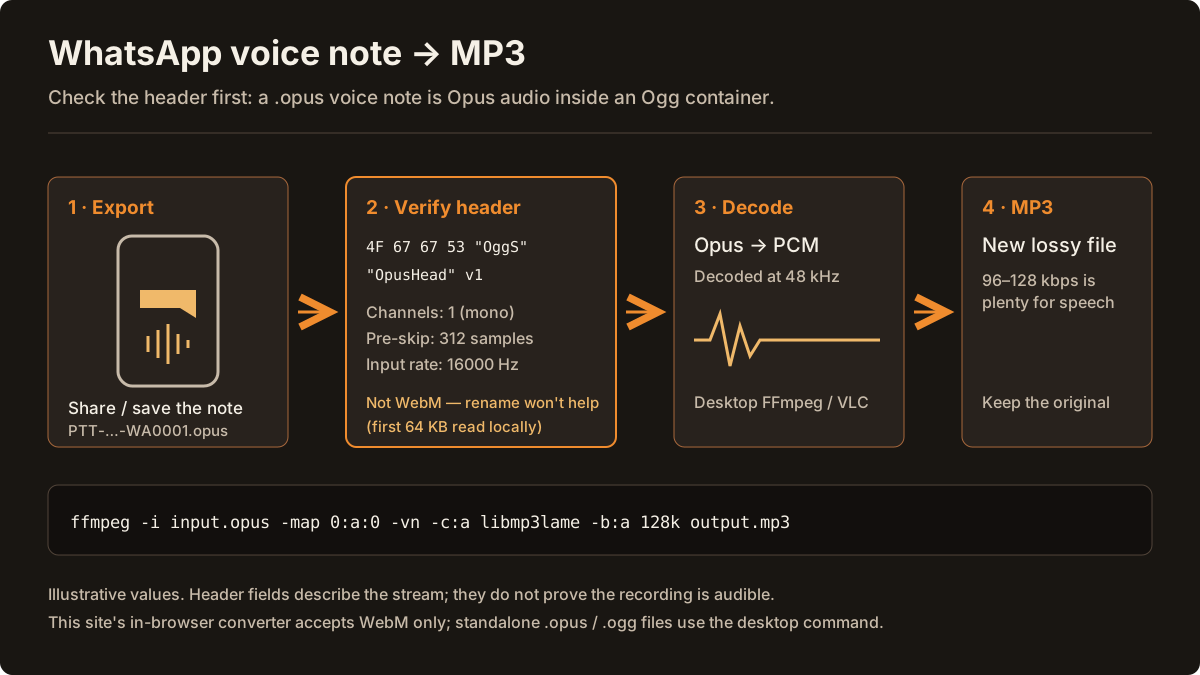
Find out what a file really contains before converting it: WebM or Matroska, Ogg Opus (such as a WhatsApp voice note), Ogg Vorbis, or a renamed MP4, WAV or MP3. The checker reads container headers only. It does not decode, repair or upload the file.
Try a sample header
Check your own file
Or drop a file here. Only the first 64 KB are read, in this browser tab; the file is not uploaded and is not changed.
Sample: PTT-20261028-WA0001.opus
Ogg Opus voice note (for example, a WhatsApp .opus file)
Desktop workflow — FFmpeg or VLC
This is Opus audio in an Ogg container, and its mono, speech-rate header is consistent with a phone voice note. This site's browser converter accepts WebM only, so changing the extension to .webm will not work.
- Magic bytes
- 4F 67 67 53 00 02 00 00
- Container
- Ogg (OggS page)
- File extension
- .opus
- Codec header
- OpusHead (Opus in Ogg)
- Channels
- 1
- Pre-skip
- 312 samples (6.5 ms at 48 kHz)
- Input sample rate
- 16000 Hz (original; Opus decodes at 48 kHz)
- Output gain
- 0 dB
- Channel mapping family
- 0
Next step: Convert it with FFmpeg (command below), or in VLC choose Media → Convert / Save → Audio - MP3.
ffmpeg -i input.opus -map 0:a:0 -vn -c:a libmp3lame -b:a 128k output.mp3Header checks cannot hear silence: a WebM can contain an audio track whose waveform is silent. Learn more in the WebM codecs guide, the Opus to MP3 guide, the FFmpeg and VLC guide and the MP3 bitrate guide.
From 48 kHz Opus timing to floating-point PCM and LAME
Opus commonly uses a 48 kHz timebase. The browser handles container parsing and decoding through AudioContext.decodeAudioData, which produces 32-bit floating-point PCM at the context sample rate. That rate may be 44.1 or 48 kHz; the app does not force 48 kHz.
The encoder converts small PCM chunks to signed 16-bit samples before passing them to JavaScript LAME. LAME creates lossy MP3 frames at the selected bitrate. This is transcoding, not a lossless copy of Opus packets. CBR output here and FFmpeg VBR output are separate workflows.
See the Opus and Vorbis codec guide and MP3 bitrate guide for format and quality trade-offs.
When Opus conversion fails
A rejected extension, multiple audio tracks, more than two channels, an oversized file or a decode error requires a different input or desktop workflow. An MP3 export cannot recover audio that was never recorded. If your source includes video, the WebM audio extraction guide explains which stream becomes the MP3.
Transcoding RFC 6716 Opus Audio Streams to Universally Compatible MP3
Defined by IETF RFC 6716, the Opus codec combines Skype's speech-oriented SILK algorithm with Xiph.Org's low-latency CELT music coder. It delivers remarkable clarity at low bitrates and powers WhatsApp voice notes, Discord voice channels, WebRTC recordings, and YouTube WebM audio streams (A_OPUS). Despite its technical superiority, many car head units, hardware DJ players, older Windows media tools, and podcast hosts still refuse to import .opus or WebM Opus files.
On this page, you can convert an Opus audio track inside a supported WebM file (or Ogg Opus when your browser's native AudioContext.decodeAudioData decodes the container) to CBR MP3 locally in your browser within the 100 MiB and 45-minute limits. The browser decoder outputs floating-point PCM at the AudioContext sample rate (it does not force a fixed 48 kHz output rate), which JavaScript LAME encodes into CBR MP3 frames. For standalone .opus files on browsers without native Ogg decoding, run the desktop FFmpeg command (`ffmpeg -i input.opus -map 0:a:0 -vn -c:a libmp3lame -b:a 192k output.mp3`).
Use the Bitrate & Codec Calculator above to compare Opus source bitrates against CBR MP3 output sizes before converting.
Quick Answers
How do I convert standalone .opus voice notes to MP3 if my browser rejects Ogg?
If your browser does not decode standalone Ogg Opus (.opus) files natively, run `ffmpeg -i input.opus -map 0:a:0 -vn -c:a libmp3lame -b:a 192k output.mp3` on desktop, or use VLC's Convert / Save workflow.
Does converting 64 kbps Opus to 320 kbps MP3 improve audio quality?
No. Re-encoding lossy Opus to lossy MP3 cannot restore frequencies already discarded, though choosing 192 kbps or 320 kbps CBR MP3 minimizes additional generation loss during transcoding.
Frequently asked questions
- How do I convert Opus to MP3?
- For Opus audio inside a .webm file, select the file in the converter, choose an MP3 bitrate, convert and download. For a standalone .opus or .ogg file, use FFmpeg or VLC on your computer; this browser tool accepts WebM only.
- Can I upload a .opus or .ogg file to this converter?
- No. This tool checks for a WebM container and accepts one Opus or Vorbis audio track. Renaming .opus or .ogg to .webm does not change its container. Use a desktop converter for Ogg Opus files.
- Does converting Opus to MP3 improve audio quality?
- No. Opus and MP3 are lossy codecs. Transcoding cannot restore discarded detail and introduces another lossy encoding step. Keep the original and choose MP3 when your destination needs it.
- Is Opus always decoded at 48 kHz here?
- No. Opus commonly uses a 48 kHz timebase, but decodeAudioData returns floating-point PCM resampled to the AudioContext sample rate. This app uses that decoded rate rather than forcing 48 kHz.
- What are the browser converter limits?
- The input must be a supported WebM file up to 100 MiB with no more than 45 minutes of audio, one audio track and mono or stereo channels. Browser decoding and available memory still determine whether conversion succeeds.
Back to the WebM to MP3 converter · Converter OPUS para MP3 (PT)