
OGG to MP3 Converter: Convert .ogg and .oga Audio Files to MP3
Convert .ogg, .oga and .opus audio files (both Ogg Vorbis and Ogg Opus) to MP3 locally in your browser when your browser's Web Audio API supports Ogg decoding, or inspect the OggS page headers and run the exact FFmpeg commands below on desktop.
Browser converter limits: one Vorbis or Opus audio stream in an Ogg or WebM container (.ogg, .oga, .opus, .webm), mono or stereo, up to 100 MiB and 45 minutes. Browser decoding support and available memory determine whether in-browser conversion succeeds.
Load .webm audio file
Drag file here or click to browse · Max file size: 100 MiB
Local Conversion History
0 filesSaved in IndexedDB. History can remain after closing this tab.
100% Local Privacy
Audio never leaves your browser. Zero upload bandwidth, no remote telemetry.
Opus Preflight Engine
Parses EBML container headers, channel layouts, and fixes live MediaRecorder duration tags.
MPEG Frame Verifier
Checks MPEG Layer III headers and complete frame boundaries; reports the frame timeline, not decoded audio quality.
How to convert an .ogg or .oga file to MP3
- Select your
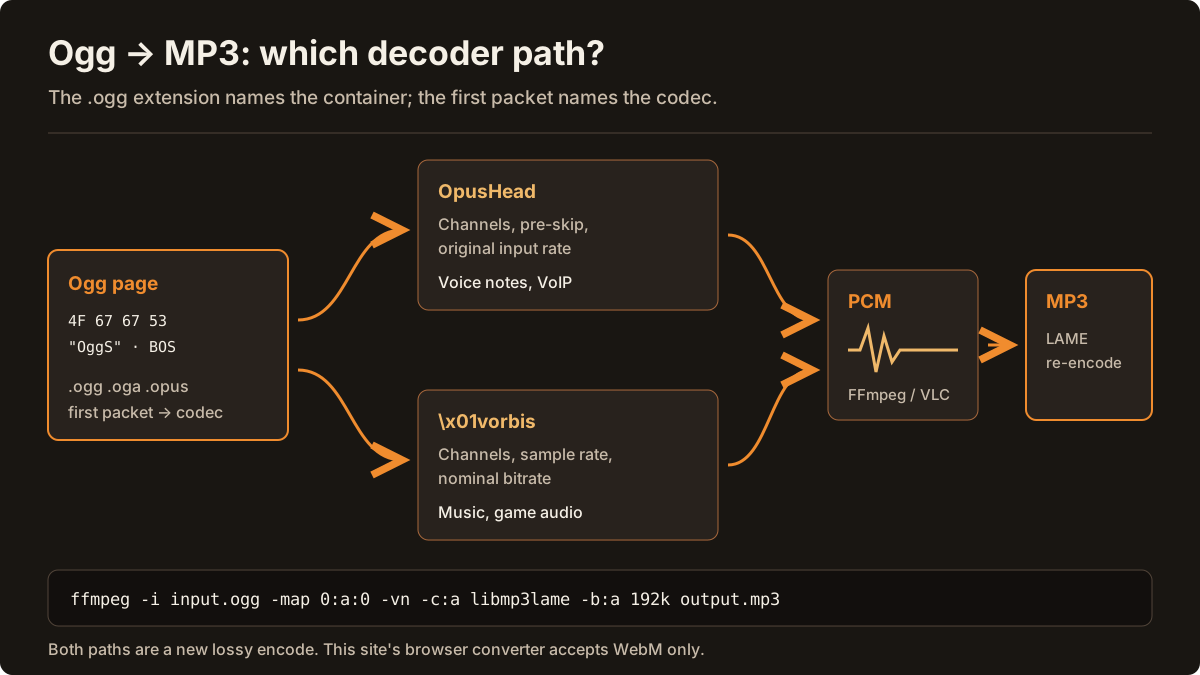
.ogg,.ogaor.opusfile in the converter above. The preflight inspector checks theOggScapture pattern (4F 67 67 53), identifies whether Page 0 carries a Vorbis (\x01vorbis) or Opus (OpusHead) header, and reads the channel count and granule duration locally. - Choose an MP3 target bitrate — 192 kbps or 320 kbps for stereo music and game audio, 128 kbps for general stereo recordings, or 96 kbps mono for spoken voice notes.
- Start conversion. When your browser's
AudioContext.decodeAudioDatadecodes the Ogg stream, the JavaScript LAME engine encodes CBR MP3 frames directly in your tab. - If your browser engine does not decode Ogg containers natively, use the FFmpeg commands below to transcode Ogg Vorbis or Ogg Opus to MP3 on your computer.
Audio files are inspected and encoded locally inside your browser tab without uploading audio bytes to a conversion server. See how to verify local processing.
WebM, Ogg and voice-note audio track checker
Find out what a file really contains before converting it: WebM or Matroska, Ogg Opus (such as a WhatsApp voice note), Ogg Vorbis, or a renamed MP4, WAV or MP3. The checker reads container headers only. It does not decode, repair or upload the file.
Try a sample header
Check your own file
Or drop a file here. Only the first 64 KB are read, in this browser tab; the file is not uploaded and is not changed.
Sample: PTT-20261028-WA0001.opus
Ogg Opus voice note (for example, a WhatsApp .opus file)
Desktop workflow — FFmpeg or VLC
This is Opus audio in an Ogg container, and its mono, speech-rate header is consistent with a phone voice note. This site's browser converter accepts WebM only, so changing the extension to .webm will not work.
- Magic bytes
- 4F 67 67 53 00 02 00 00
- Container
- Ogg (OggS page)
- File extension
- .opus
- Codec header
- OpusHead (Opus in Ogg)
- Channels
- 1
- Pre-skip
- 312 samples (6.5 ms at 48 kHz)
- Input sample rate
- 16000 Hz (original; Opus decodes at 48 kHz)
- Output gain
- 0 dB
- Channel mapping family
- 0
Next step: Convert it with FFmpeg (command below), or in VLC choose Media → Convert / Save → Audio - MP3.
ffmpeg -i input.opus -map 0:a:0 -vn -c:a libmp3lame -b:a 128k output.mp3Header checks cannot hear silence: a WebM can contain an audio track whose waveform is silent. Learn more in the WebM codecs guide, the Opus to MP3 guide, the FFmpeg and VLC guide and the MP3 bitrate guide.
Ogg Vorbis vs Ogg Opus: what is inside a .ogg header?
RFC 3533 defines the Ogg bitstream container, which frames compressed packets into pages beginning with the 4-byte ASCII capture pattern OggS (4F 67 67 53). Because .ogg names the container rather than a single audio codec, two different audio formats commonly share the .ogg and .oga extensions:
- Ogg Vorbis (
\x01vorbisheader): Page 0 starts with packet type0x01followed by the 6-byte ASCII stringvorbis, a 32-bit version field (0), channel count, sample rate in Hz (typically 44,100 Hz or 48,000 Hz) and nominal bitrate. Ogg Vorbis is widely used for desktop music libraries, Linux system sounds and game audio assets. - Ogg Opus (
OpusHeadheader, RFC 7845): Page 0 starts with the 8-byte ASCII magicOpusHead, version1, channel count, a 16-bit little-endian pre-skip sample count at 48 kHz, and the original input sample rate. Modern voice recorders, WebRTC dumps and WhatsApp voice notes often store Opus inside.oggor.opusfiles.
To convert a standard Ogg Vorbis or Ogg Opus file to 192 kbps CBR MP3 on the desktop with FFmpeg and libmp3lame:
ffmpeg -i input.ogg -map 0:a:0 -vn -c:a libmp3lame -b:a 192k output.mp3For quality-based variable bitrate (VBR) MP3 output using LAME preset -q:a 2:
ffmpeg -i input.ogg -map 0:a:0 -vn -c:a libmp3lame -q:a 2 output-vbr.mp3Compare full desktop command-line and VLC steps in the FFmpeg and VLC guide or see the Opus to MP3 guide and Opus & Vorbis codecs guide.
Opus to MP3 bitrate, file size and device calculator
Pick a duration, source stream and destination to compare estimated MP3 sizes and get a matching FFmpeg command. Estimates are constant-bitrate payload sizes; tags, headers and VBR change real files.
Duration
Source stream
Source audio at ~128 kbps for 3:00 is about 2.7 MiB. This browser converter accepts WebM input; use FFmpeg for standalone .opus files.
Destination
Estimated output size for 3:00
- 64 kbps MP31.4 MiB
- 128 kbps MP32.7 MiB
- 192 kbps MP3 (Recommended for WebM/Opus)4.1 MiBSuggested for this use
- 320 kbps MP36.9 MiB
- Uncompressed WAV (1,411 kbps)30.3 MiB
Suggested: 192 kbps MP3 for Music & Headphones
192 kbps CBR MP3 gives headroom for a ~128 kbps Opus source: MP3 is less efficient than Opus, so matching the source bitrate can add audible artifacts, while going higher mostly adds size. A higher bitrate cannot restore detail the lossy source never kept — compare the sound and size yourself.
ffmpeg -i input.webm -vn -c:a libmp3lame -b:a 192k output.mp3Typical playback support by device
| Device | .webm (Opus/Vorbis) | .opus | .ogg | .mp3 (CBR) |
|---|---|---|---|---|
| Car Stereo USB (FAT32) | Unlikely | Unlikely | Varies | Usually plays |
| Apple iPhone / iPad (Files & Music) | Varies | Varies | Varies | Usually plays |
| Pioneer Rekordbox / Serato DJ | Unlikely | Unlikely | Varies | Usually plays |
| Android Default Player | Usually plays | Usually plays | Usually plays | Usually plays |
| Podcast RSS Hosting (Spotify / Apple) | Unlikely | Unlikely | Unlikely | Usually plays |
| Web Browser Audio (<audio>) | Usually plays | Varies | Varies | Usually plays |
Apple iPhone / iPad (Files & Music): Files and Safari may preview newer WebM/Ogg audio depending on iOS version; the Music app library expects formats such as MP3 or AAC.
Learn more in the Opus to MP3 guide, the FFmpeg and VLC desktop guide and the WebM video audio-track guide.
Troubleshooting .ogg files that fail to decode or play silently
If an .ogg file fails preflight validation or produces no sound, verify that the file is not a renamed MP4/M4A (ftyp) or WebM (1A 45 DF A3) container, and check whether it contains multiple muxed audio streams (such as multi-language game dialogue). You can inspect the first 64 KB of any file in the WebM & Ogg audio checker, extract audio from video containers via the WebM audio extraction guide, or review LAME bitrate targets in the MP3 bitrate guide.
Decoding RFC 3533 Ogg Vorbis & Ogg Opus Containers to MP3 Locally
An .ogg or .oga file is an RFC 3533 bitstream container framed by 4-byte 'OggS' (4F 67 67 53) page capture patterns. Because .ogg names the container rather than a single audio codec, your file might hold a traditional Vorbis stream (0x01vorbis header) exported from Audacity or Spotify caches, or a modern Opus stream (OpusHead header) saved from WhatsApp, Telegram, or WebRTC voice recorders.
Our local OGG to MP3 converter inspects Page 0 of the Ogg bitstream in your browser before decoding begins. It verifies page CRC-32 checksums, detects whether the stream is Vorbis or Opus, reads the channel layout and final granule position, and—when your browser's AudioContext.decodeAudioData supports the Ogg stream—encodes a universally compatible CBR MP3 file using JavaScript LAME without uploading your audio.
Convert .ogg, .oga and .opus files up to 100 MiB and 45 minutes directly in your browser tab, or use the included FFmpeg libmp3lame commands on desktop.
Quick Answers
How do I know if my .ogg file uses Vorbis or Opus?
Drop the file into our converter or WebM & Ogg Audio Checker. The preflight inspector reads the first OggS page: a '\x01vorbis' signature indicates Ogg Vorbis, while an 'OpusHead' signature indicates RFC 7845 Ogg Opus.
Can I convert WhatsApp and Telegram .ogg voice notes to MP3 here?
Yes. WhatsApp and Telegram voice messages are typically mono Ogg Opus files. Drop the .ogg or .opus file into the converter and choose 96 kbps or 128 kbps mono MP3.
Frequently asked questions
- Can I convert .ogg and .oga files to MP3 in the browser?
- Yes, when your browser Web Audio API supports decoding Ogg Vorbis or Ogg Opus. Select a .ogg, .oga or .opus file up to 100 MiB and 45 minutes (mono or stereo); the converter inspects the OggS header locally and encodes MP3 in JavaScript.
- What is the difference between Ogg Vorbis and Ogg Opus inside a .ogg file?
- Both use the RFC 3533 Ogg container starting with the OggS capture pattern (4F 67 67 53), but Page 0 carries a different identification header: 0x01vorbis for Vorbis music/game audio or OpusHead for RFC 7845 Opus voice notes and streams.
- What if my browser cannot decode an Ogg file?
- Browser decodeAudioData support for Ogg containers varies by browser engine and operating system. If in-browser decoding is unavailable, the preflight inspector still parses the OggS header facts and provides the exact FFmpeg command: ffmpeg -i input.ogg -map 0:a:0 -vn -c:a libmp3lame -b:a 192k output.mp3.
- Which MP3 bitrate should I choose when converting Ogg to MP3?
- Both Ogg (Vorbis or Opus) and MP3 are lossy formats, so transcoding cannot restore detail already discarded by the source. Choose 192 kbps for stereo music or game audio, 128 kbps for general stereo speech, or 96 kbps mono for single-speaker voice recordings.
- Are my .ogg audio files uploaded to a server?
- No. Ogg page header inspection, Web Audio API decoding and JavaScript LAME MP3 encoding run locally inside your browser tab. Audio files are not uploaded to a conversion server.
Back to the WebM to MP3 converter · Converter OGG para MP3 (PT) · Convertir OGG a MP3 (ES) · Конвертер из OGG в MP3 (RU)